
Financial Reports in Seconds,
Not Hours
Generate profit & loss statements, tax summaries, and cash flow reports from your invoices and expenses. Know exactly where your business stands at any time.
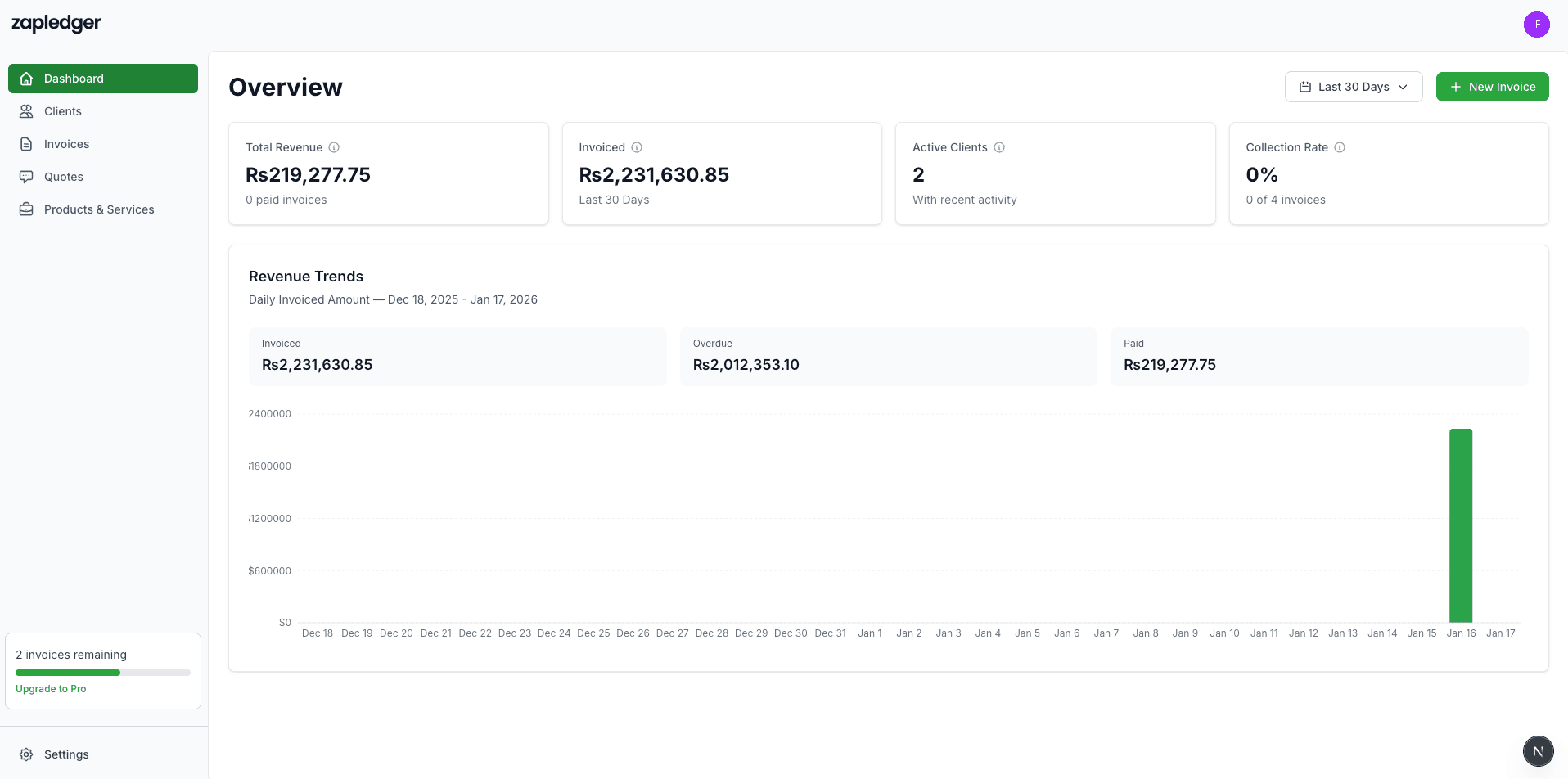
How Financial Reporting Works
Your invoices and expenses feed directly into reports—no manual data entry.
Profit & Loss at a Glance
Your dashboard pulls together invoice revenue and business expenses to show net profit and profit margin. No spreadsheets—just open Zapledger and see where your business stands for the period you choose.
Tax-Ready Expense Summaries
Expenses are categorized as you record them. At tax time, review spending by category—software, travel, office supplies, and more—without digging through receipts or bank statements.
Cash Flow Visibility
See how much you've collected, what's still outstanding, and which invoices are overdue. Payment tracking and financial reporting work together so you always know your real cash position.
Date Range Filters
View reports for today, this month, this year, or custom periods. Compare revenue and expenses over time to spot trends and plan ahead—without exporting to another tool.
What You Get
All of this is available in your Zapledger account.
Combine reporting with expense tracking, payment tracking, and simple pricing.
Ready to See Your Numbers Clearly?
Stop guessing. Get profit, loss, and cash flow reports from the data you already track.
Get Started Free